Your business starts set up for its own trade
Pick your industry and the panel gets that trade's pipeline, custom fields, tags, ready replies, paused playbooks and Metro tiles. Five short questions fit the kit to your business, and sample customers come and go in one click.
Product update 2 min read
What changed
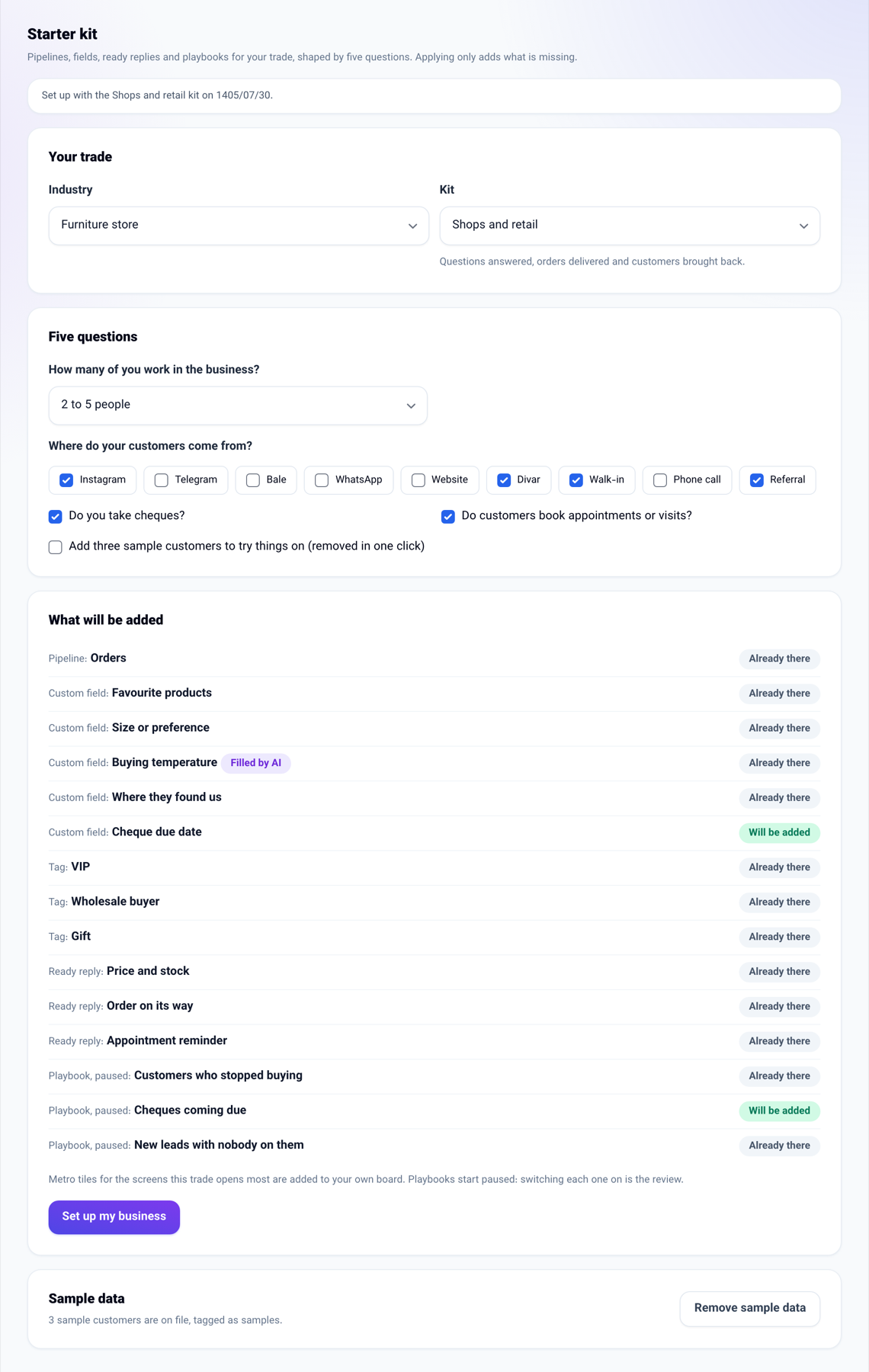
Until now a new business started with an empty sales board and everything else was yours to build. Now every trade has a starter kit, in ten families from salons and clinics to property, contractors, wholesale and restaurants:
- A pipeline with the columns that trade moves people through — for property, "New enquiry, Viewing booked, Offer made, Contract signed".
- The custom fields that trade always asks, plus a "Buying temperature" field the AI fills from the conversations.
- Suggested tags, ready in the customer file's tag box.
- Two ready replies for conversations.
- That trade's playbooks, created paused so you read each one before switching it on.
- Metro tiles for the screens that trade opens every day.
A kit only adds: a pipeline, field, reply or playbook you already have under the same name is left alone, and pressing the button again creates nothing twice.
How to use it
- Open Business settings → Business profile, and the Starter kit tab.
- Pick your industry; its kit is picked for you.
- Answer the five questions: how many of you there are, where customers come from, whether you take cheques, whether customers book appointments or visits, and whether you want three sample customers to try things on.
- Read the list under "What will be added"; what you already have says "Already there".
- Press Set up my business.
- When you are done trying, press Remove sample data on the same page.
If you sign up from the Industries page on the website, your industry is already picked when you create your first business, and the business is created with its kit.
Good to know
- Only somebody who manages the business can apply a kit.
- The answer to "where do your customers come from" makes a "Where they found us" field with those choices; "Do you take cheques?" adds a "Cheque due date" field and a "Cheques coming due" playbook.
- Sample customers have no number or email, so they can never be matched to a real person, and carry the "Sample" tag.
- In the chat console you can also say "set my business up as a hair salon".
- The Buying temperature field is filled from the business's AI credit; if you do not want it, switch it off in Custom fields.