The phone app sends a call's recording and reads a business card
In the NabuOS phone app, Log this call? now takes the call's recording too, and its summary fills in the call you just logged. On the Customers tab, a photo of a business card from the camera or the gallery is read and saved as a lead. Both need the new app build.
Product update 3 min read
What changed
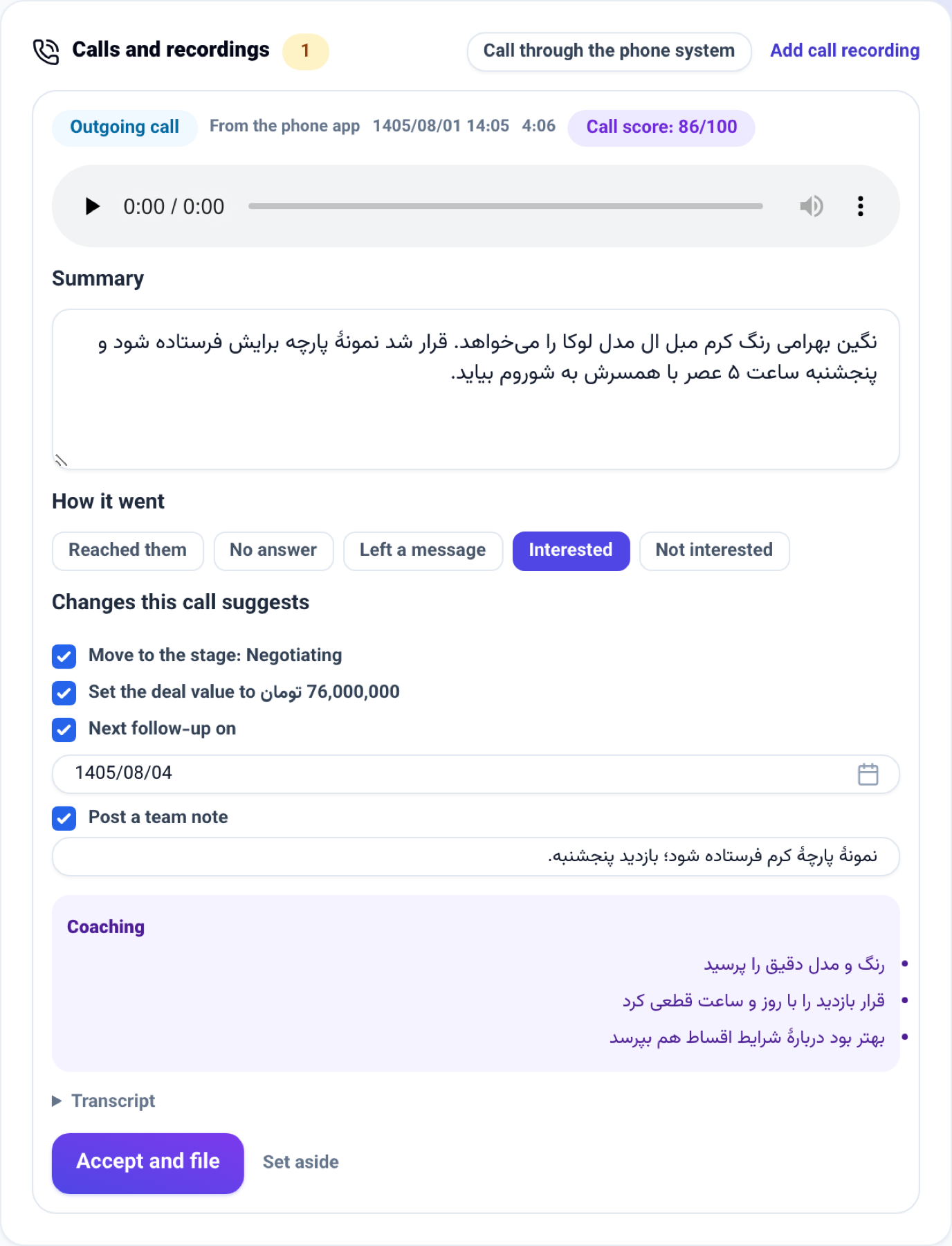
- A call's recording from the phone. When you dial a customer from their card and come back to the app, Log this call? now has Add the recording (optional). Pick the file your call recorder saved, and after the call is logged the recording is sent to the customer's file. It is transcribed and summarised into the same review card the panel makes under Calls and recordings, and when you accept it, the summary fills in the call you just logged: one call stays one row on the file, not two.
- A business card from the phone. The + in the Customers tab's search bar now opens Add a lead, with Photo of a business card at the top: Camera to photograph a card, or Gallery to pick a photo you already took. The card is read the way the panel's Capture a lead screen reads it, the person is saved on the same Business cards list and given to you, and their file opens. A link or text can still be pasted under it, as before.
How to use it
The recording
- Open a customer on the Customers tab and tap their number to call them.
- When you come back to the app, Log this call? opens. Tap how it went and, if you like, write what was said.
- Tap Add the recording (optional) and pick the call's file.
- Tap Log the call. A minute or two later the call card is on the customer's file in the panel; check the summary there and press Accept and file.
The business card
- On the Customers tab, tap the + in the search bar.
- Under Photo of a business card, tap Camera and photograph the card, or tap Gallery and pick its photo.
- When the card has been read, the customer's file opens. Check the name and the details there, and correct anything that was misread.
Good to know
- Both need the new build of the app. They use the phone's file picker and camera, which arrive with the next APK; the app has no automatic updates. Install it again from dl-crm.nabuxai.com.
- A recording can be up to 25 MB, as MP3, M4A, WAV, OGG, WEBM or AAC. The app says so before sending if a file is too large, or is AMR (Android's own call recorder), which has to be converted first.
- When the call is logged but the recording could not be sent (no signal, a refused file), the sheet stays open with Send the recording, so only the recording is sent again and the call is not logged twice.
- A card photo can be a JPG, PNG or WEBP of up to 8 MB. Unlike the panel's screen, the phone saves the person straight away; correct a misread line on their file.
- Reading a card and transcribing a recording are charged to the business's AI credit. A card that cannot be read saves nobody and says so.
- Only a key that may write, and a seat that may add customers, can save a card; the camera is asked for only when you tap Camera.