Filter contacts by a custom field, AI-filled ones included
In "Contacts" you can now pick a custom field and an answer, and the list keeps only the people with that answer — say "buying temperature: hot", filled in by the AI from their conversations.
Product update 1 min read
What changed
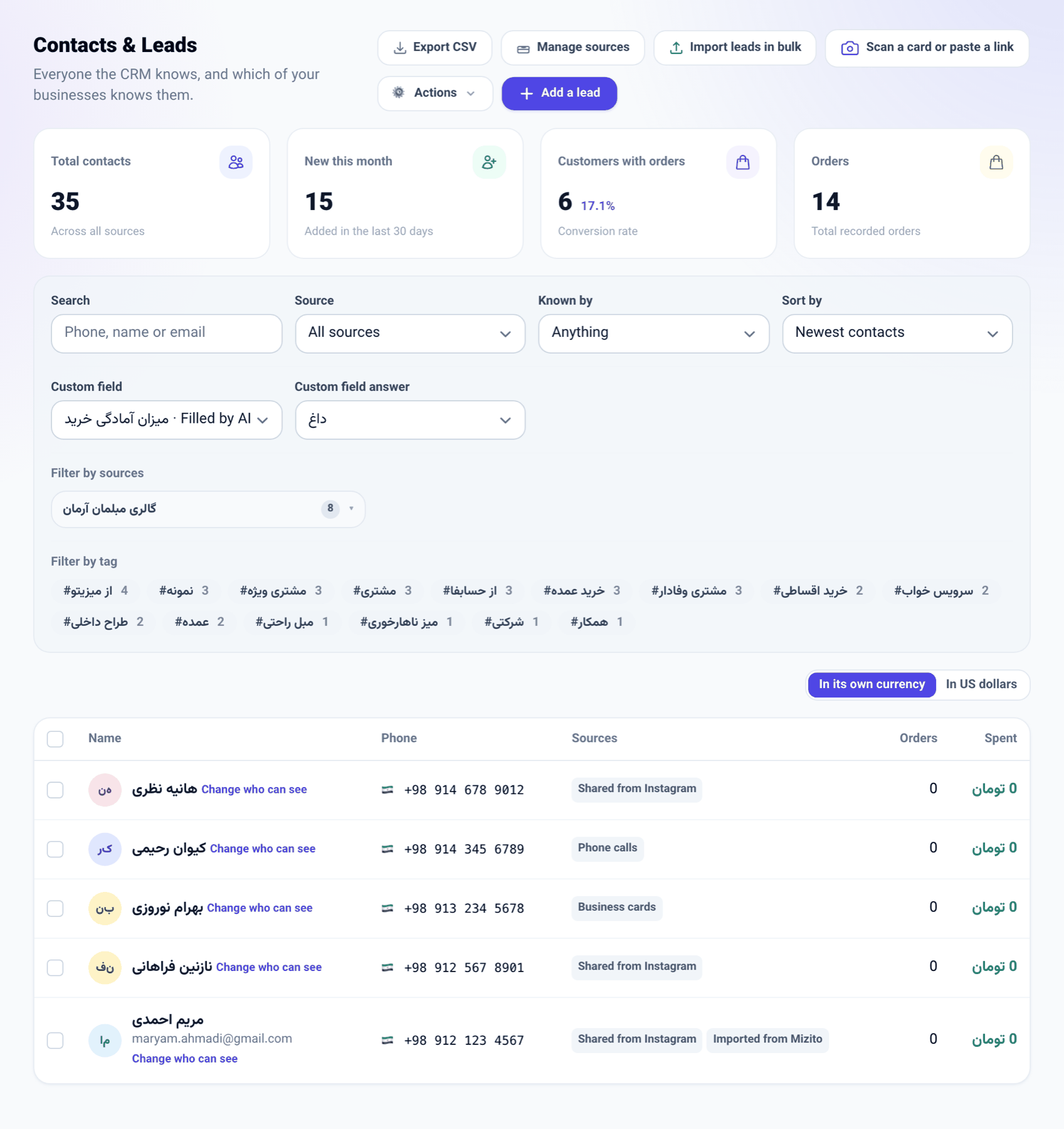
Beside the search, source, "Known by" and sort controls there is a new row: Custom field and Custom field answer. Pick a field, give the answer, and the list shows only those contacts.
- Fields the AI fills are in the list too, marked "Filled by AI".
- For a field with choices (a pick list, or a yes/no tick) you pick the answer from its list; for anything else you type it.
- The filter stays in the page address like the other filters, so you can bookmark it or send it to a colleague.
How to use it
- Open "Contacts".
- Under "Custom field", pick the field.
- Under "Custom field answer", pick or type the answer; the list narrows at once.
- To drop the filter, set "Custom field" back to "Anything".
Good to know
- A typed answer is matched whole: "North" is not "North Tehran". It is the same rule segments use, so a segment built on the same field takes the same people.
- Only this business's own custom fields and the install-wide ones are offered; another business's fields and answers never reach this list.
- The row shows only when the business has at least one custom field on contacts.