Approval rules for estimates, discounts, expenses, purchases and refunds
Decide which documents need whose yes before they go out — an estimate or proposal over an amount, a discount over a percentage, an expense under a heading, a purchase order or a credit note. Approvers answer in order, on the panel or with /approve_doc_N on Telegram.
Product update 2 min read
What changed
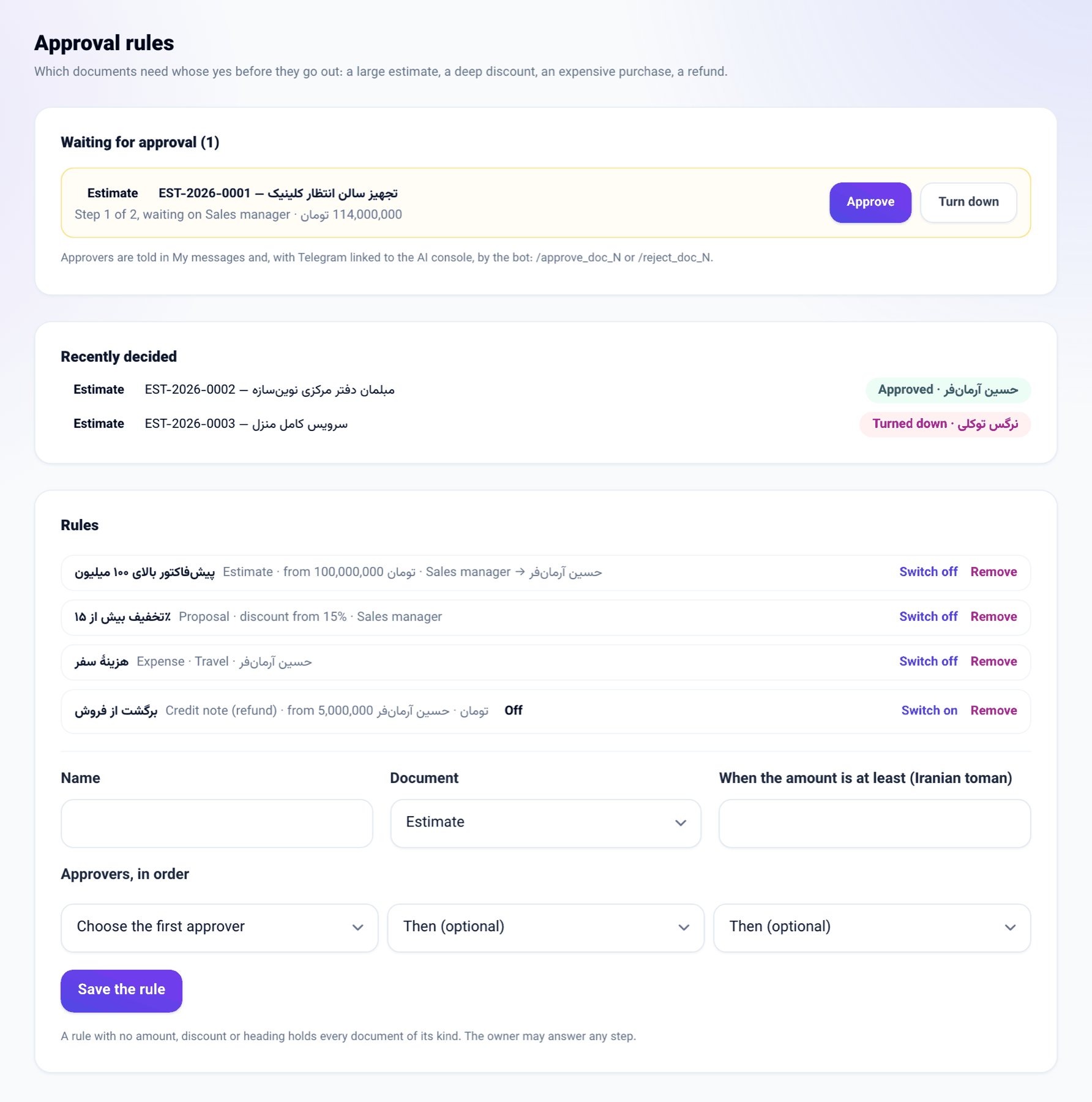
- A new Approval rules screen under Business settings. A rule names a kind of document (estimate, proposal, invoice, expense, purchase order, credit note), a condition (an amount of at least…, a discount of at least…%, or an expense heading) and up to three approvers in order. Each approver is a seat, such as Sales manager, or one person.
- A document a rule covers does not go out until it is approved: an estimate or proposal is not marked sent, an invoice's pay link is not sent and its pay page does not open, a purchase order is not sent to the supplier, and a credit note is not issued. An expense is written down but stays waiting for approval until the last approver says yes.
- The first attempt to send opens the request and tells the first approver in My messages. If they linked Telegram to the AI console, the bot tells them too, with /approve_doc_N and /reject_doc_N.
- After the last approver says yes, the same send button works. A larger amount or a deeper discount afterwards asks again. A credit note's approval covers one issue.
How to use it
- Go to Business settings → Approval rules.
- Give a name, choose the Document, fill in the condition and pick the first approver — and the next ones if you want — under Approvers, in order. Press Save the rule.
- Approvers find the request in My messages, under Waiting for approval on this screen, or on Telegram, and press Approve or Turn down.
- Once approved, whoever made the document presses send again.
Good to know
- Rules are written by a seat that manages the business. The owner of the business may answer any step.
- A rule with no condition holds every document of its kind. With no rule at all, everything works as before.
- Estimates carry no discount of their own, so only their amount is judged. An invoice's discount is worked out from its lines.
- Paying a payslip from Team and payroll never waits on an expense rule: the payment is the approval.