Customers can pay your invoices in installments with Snapp Pay
With your own Snapp Pay contract, the payment page offers \"Pay in installments with Snapp Pay\" whenever Snapp Pay accepts the amount. The customer pays Snapp Pay over months; the invoice is paid at once, and Snapp Pay's settlement waits in your books until it arrives.
Product update 3 min read
What changed
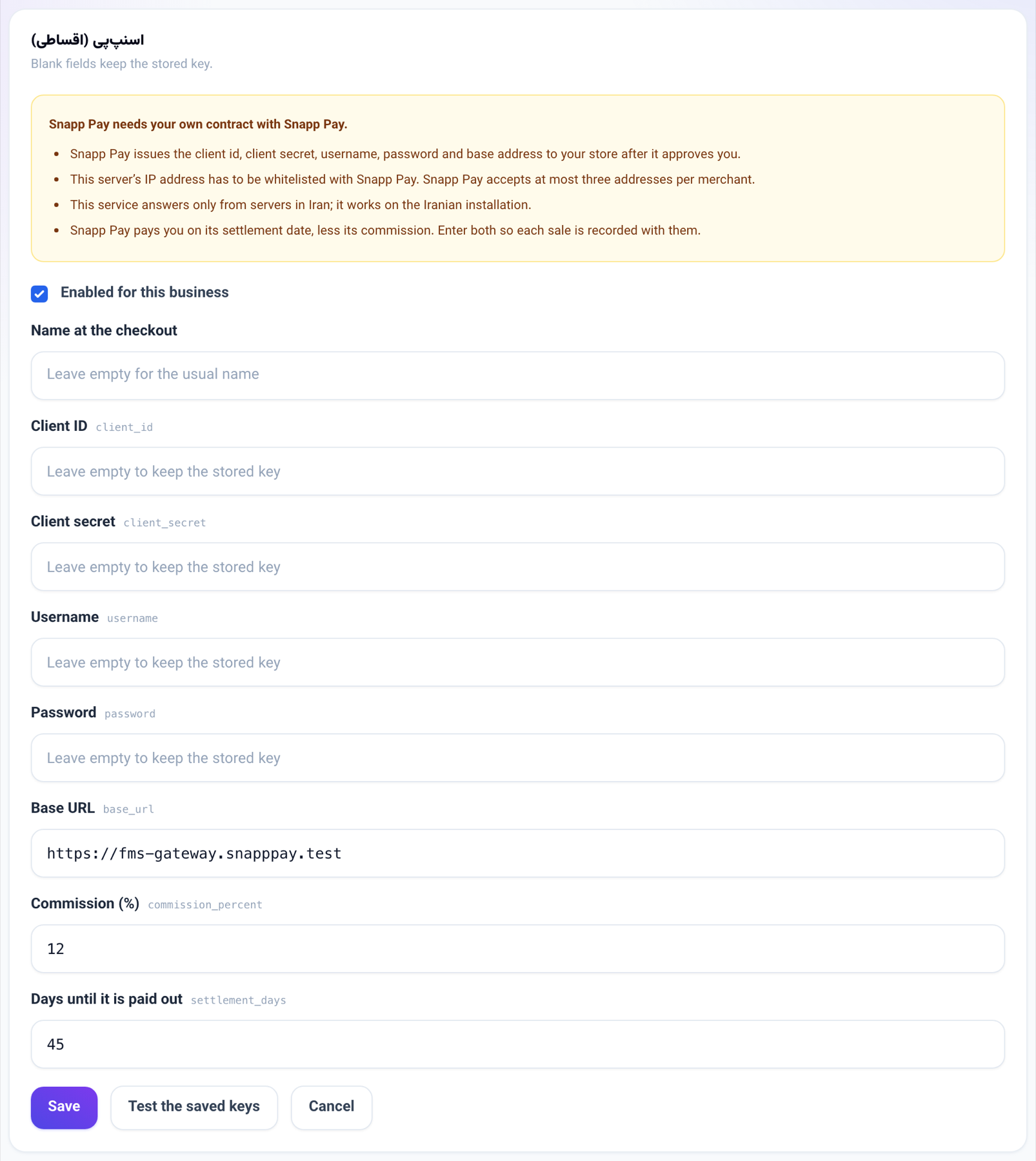
A business with its own Snapp Pay merchant contract can now let customers pay an invoice or a payment link in installments.
- The payment page asks Snapp Pay first whether it offers installments for that amount. Only then does it show the option, under the words Snapp Pay gives, or "Pay in installments with Snapp Pay".
- The customer is sent to Snapp Pay with the invoice's lines, pays the first installment there and comes back to the page that says the payment went through.
- The invoice is paid at once, and the purchase is recorded as money Snapp Pay owes you, with your commission and the day it pays you. It shows on the cash radar on that day, and you settle it in one press when the money arrives (see "Paid through an installment app").
- A credit note on such an invoice is sent to Snapp Pay: a full one cancels the purchase, a partial one reduces it. If Snapp Pay refuses, the note still stands and says so, so you can finish it in Snapp Pay's panel.
How to use it
- Sign your own contract with Snapp Pay. Snapp Pay gives your store a client id, client secret, username, password and base address.
- Ask Snapp Pay to whitelist this server's IP address. Snapp Pay accepts at most three addresses per merchant.
- Open Business settings → Payment gateways, press Edit beside Snapp Pay and enter the five keys. Enter the commission you agreed in commission_percent and the days until Snapp Pay pays you in settlement_days.
- Tick Enabled for this business and press Save.
- Press Test the saved keys. When it answers that the keys work, your customers see the option on the payment page from then on.
Good to know
- Snapp Pay is off for every business until it enters its own keys; there is no shared platform account.
- Snapp Pay answers only from servers in Iran, so this works on the Iranian installation. On a server abroad the option simply does not appear, and the settings screen says why.
- Snapp Pay needs the customer's mobile number; the payment page asks for it.
- Snapp Pay takes a whole invoice. An invoice with part of it already paid does not offer it.
- Snapp Pay has its own conditions for a store (an e-namad, a business licence, enough products). Its commission and settlement period are set in your contract.
- Pasargad's gateway can no longer use a business's own keys: the way it signs in cannot keep two businesses apart. A business that had entered them sees it as off in the Connections book.