Record a payment made through an installment app, and settle it when the app pays
When a customer pays with Snapp Pay, Digipay, Tara, Lendo, Azki Vam or Torob Pay, record it on the invoice with the tracking code. The invoice is paid, the app owes you the money until its settlement date, the cash radar shows it coming in on that day, and one press records the settlement and its commission.
Product update 3 min read
What changed
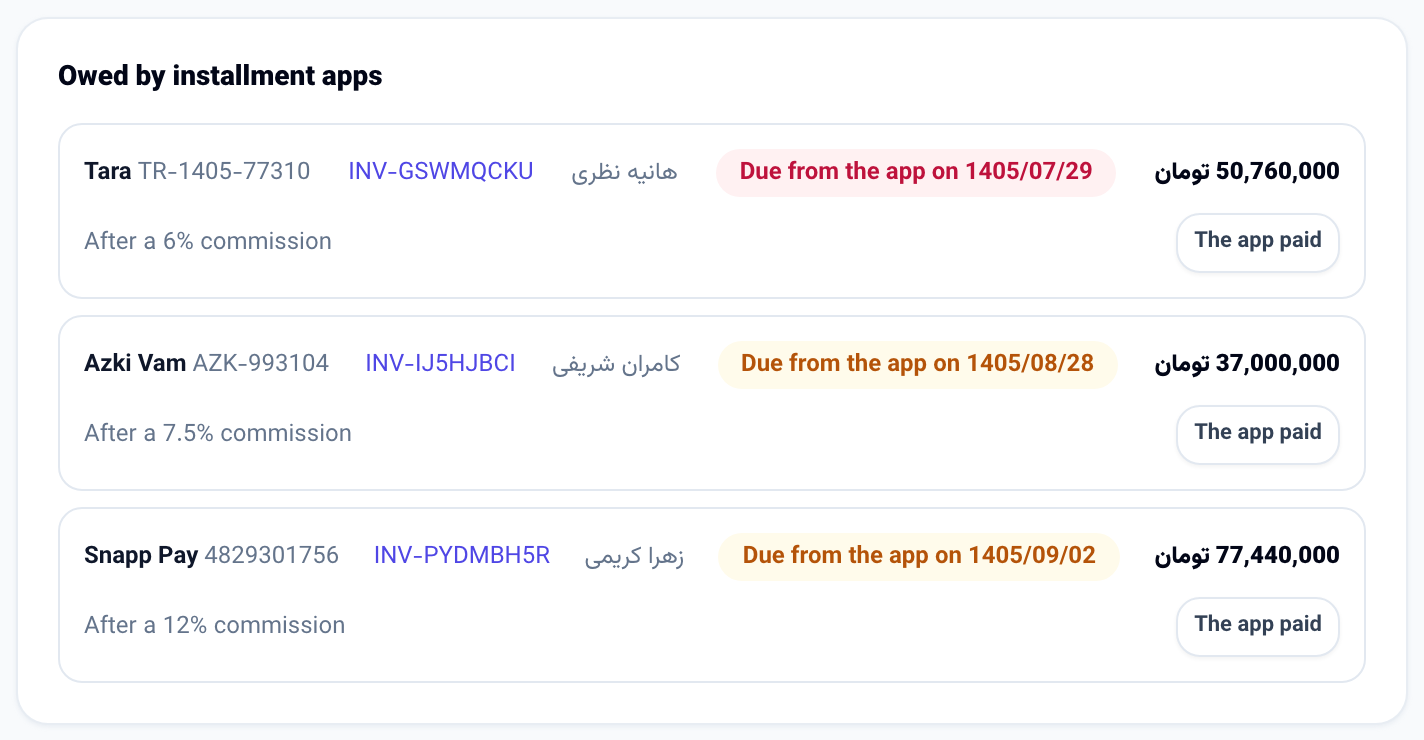
Customers often pay through an installment app: they owe the app, and the app pays you weeks or months later, less its commission. Until now the only way to record that was to mark the invoice paid as if the money were already in your bank.
Now an invoice has a section called Paid through an installment app:
- Choose the app (Snapp Pay, Digipay, Tara, Lendo, Azki Vam, Torob Pay or another one), enter the tracking code the app gave, and optionally the commission you agreed and the day the app pays you.
- The invoice is paid at once: the customer owes you nothing more.
- In the books the money sits in its own account, Owed by installment apps, until the app pays. It is not counted as money in your bank.
- The Cash radar shows each one as money coming in on the day the app pays, less its commission.
- When the app pays, press The app paid, choose the account the money arrived in and check the amount. Whatever the app kept of what it owed is booked as Installment app commission.
- A credit note on such an invoice comes off what the app owes, because the app gives the customer the money back, not you.
How to use it
- Open Money and accounting → Invoices and open the unpaid invoice.
- Open The customer paid through an installment app.
- Choose the App, enter the Tracking code, and if you know them, the Commission % (optional) and The app pays on. Leave Amount empty to record the whole balance.
- Press Record the payment.
- When the app pays, open Money and accounting → Books → Owed to you. Under Owed by installment apps, press The app paid beside the payment, choose Arrived in, check What arrived and press Record the settlement. The same button is on the invoice.
Good to know
- Lendo's loan card is paid like any bank card, through your usual payment gateway; record it as a normal payment. Record it here only if the app pays you later.
- For an app this panel cannot reach (all but Snapp Pay's own checkout), take a refund back in the app's own panel; the credit note still comes off what the app owes.
- Recording and settling are for roles that manage billing. You can also ask the console "what do the installment apps owe us?" or tell it the app paid; both wait for your approval.